ClevGuard, known for its reliable smartphone tracking and computer monitoring programs, has released a significant update to MoniVisor, its state-of-the-art Windows-based screen monitoring software. MoniVisor provides users with comprehensive oversight of how PC equipment is accessed and used, whether at home, in the office, or in educational settings. This update aims to protect business confidentiality by tracking employee emails, chats, files, and web usage, while also allowing parents to monitor children's online activities and games.
The standout features of MoniVisor include:
Browser history: Logs all visited websites, URLs, and usage duration, including download history.
File activities: Tracks access to files and documents on the device, including deletion, movement, and creation.
Software usage: Monitors the usage of installed programs and records the duration of time spent on each software.
Email monitoring: Records all exchanged emails, compatible with Gmail, Yahoo, and Outlook.
IM tracking: Records conversations from instant messaging apps and social media platforms such as WhatsApp, Facebook, Skype, and Telegram.
The new update introduces two primary features that enhance MoniVisor's capabilities:
Remote Screenshot: Allows users to capture the current state of a screen on a remote device, taking a snapshot of whatever is displayed without needing physical access.
Live Screen: Enables real-time viewing of ongoing activities on a remote device, providing immediate insight into the target device's usage.
Capture screenshots: The remote screenshot capture feature allows instant snapshots of the target device's screen without alerting the user.
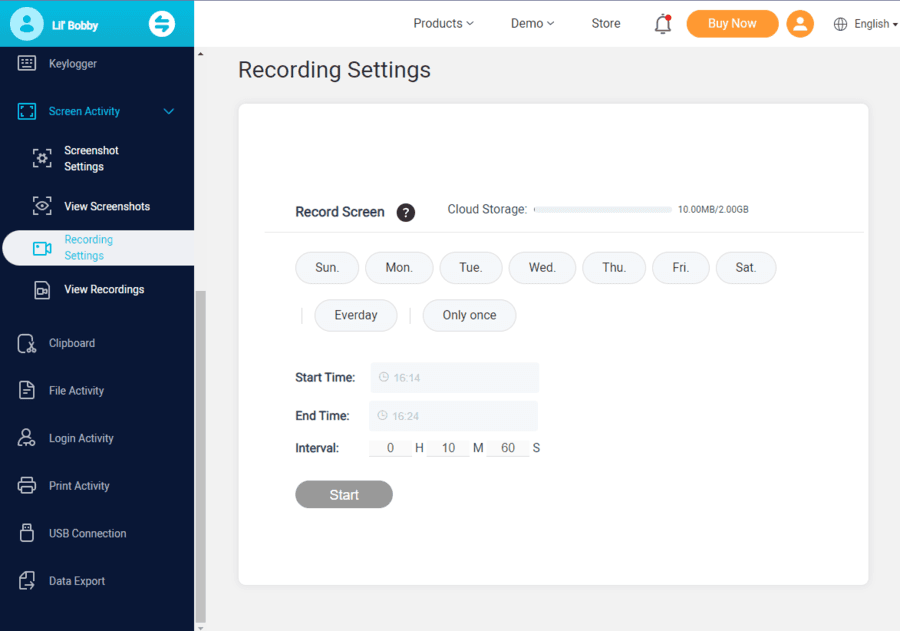
Live-screen monitoring: The updated MoniVisor features enable live monitoring of the target screen in real-time, taking screenshots every 15 seconds and syncing them to the online dashboard.
Data export: Captured screenshots and recorded videos can be downloaded for later review in MP4 format.
User-friendly interface: Designed for ease of use, allowing full setup and start of online tracking in just four steps.
Multi-platform compatibility: Compatible with Windows 7, 8, 10, and 11, providing comprehensive coverage.
Utilizing MoniVisor involves four simple steps:
Step 1: Register for an account: Choose a plan and try the free demo before registration.
Step 2: Download and install MoniVisor: Install the software on the target device with a Chrome extension for easy installation.
Step 3: Log in to the dashboard: Access the User Center and navigate to the online dashboard.
Step 4: Start monitoring: Track all on-screen activities such as internet site access, chat forums, emails, or games.
MoniVisor offers significant benefits for home, office, and educational use:
Parental control: Guides children to safe online experiences and prevents exposure to inappropriate content.
Employee monitoring: Protects company confidentiality, optimizes productivity, and ensures compliance with policies.
Remote learning or work: Helps supervise students, keeping them focused on their studies and avoiding distractions.
With this update, MoniVisor strengthens its position as a comprehensive monitoring solution, catering to the needs of parents, employers, and educators, while providing robust monitoring capabilities for Windows PC users.